Settings and where nfty keeps things
The Settings card
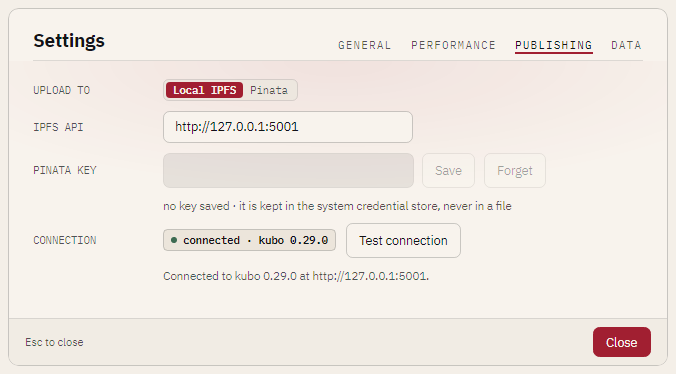
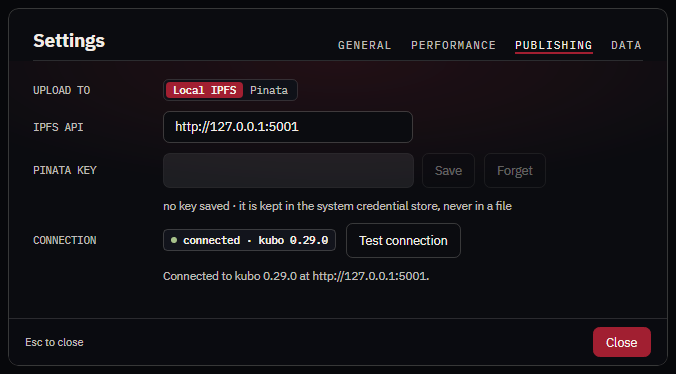
Press the gear in the title bar. The card has four pages, and a fifth, SYSTEM, on Windows.
GENERAL
| Control | Does |
|---|---|
| Theme | System follows your operating system; Light or Dark always. The title bar's theme button changes the same setting, and both are remembered. |
| New canvas | The side, in pixels, a new CookBook's canvas and a new loose Ingredient's canvas start at (32 unless you change it). The new-item form can still change it; past 512 the card warns that cooking many assets that size is slow. |
PERFORMANCE
Worker threads: how many threads heavy work uses (reading and writing archives, cooking, exporting, building models). Auto uses two thirds of the machine's logical processors; a custom value lets you pick a number. The count never changes what is written: the same book and seed give the same bytes at any thread count.
If the NFTY_THREADS environment variable is set, it wins for the session: the control is locked and
says so. The command line takes --threads N or max on every command, and falls back to the same
variable.
PUBLISHING
Where the export card's Upload goes.
| Control | Does |
|---|---|
| Upload to | Local IPFS (the default): IPFS Desktop or Kubo on this machine, no account and no key. Pinata: the hosted pinning service, with your own key. |
| IPFS API | The local node's RPC address, http://127.0.0.1:5001 unless you changed your node's. |
| Pinata key | Paste the API key's JWT and press Save. It goes to your system's credential store (Windows Credential Manager, the macOS keychain, the Secret Service on Linux through secret-tool) and nowhere else; the card shows only •••• and its last four characters. Forget removes it. Where no credential store can be reached (on Linux, install libsecret-tools and run a keyring), the card says so and refuses to save: nfty never falls back to a plain file. |
| Connection | Whether nfty can talk to the chosen service right now, checked when the card opens, when you change provider or key, and when you press Test connection. |
DATA
| Control | Does |
|---|---|
| Kept in | Where the .nfty folder below is, or that this session keeps nothing on disk. |
| Clear recents | Forgets the start screen's Recent list. No file is touched. |
| Reset | Viewer windows open at their default sizes again, and the editor at its default grid and rail. |
| Open folder | Opens the .nfty folder. |
SYSTEM (Windows only)
Which files Windows opens with nfty, for this Windows user. See Open files with nfty on Windows.
| Control | Does |
|---|---|
| NFTY FILES | .cbk .rcp .igt .set .tin .ktn .mnu: Off, App, or Viewer (the viewer alone, no app window). A Menu always opens in the viewer. |
| PICTURES, 3D | .png .jpg .jpeg .glb .gltf: Off or Viewer. |
| METADATA | .json: Off or Viewer. |
| Registration | registered, not registered, not applied (changed above), or needs repair (pointing at another copy of nfty, or incomplete), with the reason under it. |
| Apply / Repair | Registers the choice: nfty's ProgIDs, the Open with entries, and nfty's entry in Windows Default apps. Becomes the default for nfty's own extensions when no other program claims them. No administrator rights. |
| Remove | Deletes exactly what nfty registered; nothing another program wrote. |
| Default apps… | Opens Windows Settings on nfty's Default apps page. Windows lets only you make a program the default for .png, .jpg, .json and models. |
The registered commands are "<folder>/Nfty.Desktop.exe" "<file>" (app) and "<folder>/Nfty.Desktop.exe" --viewer "<file>" (viewer); the same switch works from a shortcut or a terminal.
Environment variables
| Variable | Does |
|---|---|
NFTY_THREADS |
The worker thread count, as a whole number or max. Read when --threads is not given, and locks the Settings card. |
NFTY_PERF |
Set to 1 to switch on the built-in timing scopes (Nfty.Core.Diagnostics.Perf), which record wall time and allocation for whole operations. Nothing prints by itself: a program embedding the libraries reads them with Perf.Report(). Off, a scope costs one branch. It never changes what is written. |
The .nfty folder
nfty keeps its state in a .nfty folder, normally beside the program, so a copy carries its own
history. Files inside:
| File | Holds |
|---|---|
recents.json |
The recent-files list. |
palette.json |
Your saved swatches, one list for Gray and one for Color. |
editor-view.json |
The editor's remembered view choices. |
settings.json |
The Settings card's choices: thread count, theme, starting canvas, upload provider and IPFS API address. Never the Pinata key. |
viewer-window.json |
The viewer window's size and position. |
Delete the folder and everything starts fresh. Your books and Sets are the files you chose, wherever you put them, and are never stored here.