What a Set contains
Cooking writes a folder. With Pack ticked you also get the same collection as a single .set
archive, written inside that folder and named after it -- everything a cook produces stays in the
folder you chose.
collection/
  images/       0001.png, 0002.png, ...
  metadata/     0001.json, 0002.json, ...     the standard format
  nfty/         0001.json, 0002.json, ...     the rich format
  set.json                                     the collection as a whole
  collection.set                               with Pack ticked: all of the above, zipped
The archive holds those four things and nothing else. Not whatever else is in the folder: cook
into a Kitchen, or into a folder where you keep your .cbk, and the archive still carries only the
Set. It never contains itself, or a .set from an earlier cook, so cooking again -- or extending --
replaces it rather than nesting the old one inside the new.
nfty inspect reads either form -- the folder or the .set -- and reports what the run produced:
its seed, the CookBook hash behind it, whether unique DNA was required, and the trait percentages the
collection actually came out with. See Command line.
Two metadata files per asset, on purpose: one that marketplaces understand and one that keeps everything nfty knows. Neither is a subset of the other.
Exports are Sets too, minus what you left out
Exporting writes the same shape with parts removed -- a
marketplace export has no nfty/, and one for a collaborator has a .cbk beside set.json.
set.json is never optional: it is what makes the result a Set rather than a folder of pictures.
A sealed export is the exception. It is a .tin, and its shape is different:
Chest Demo.tin
  seal.json       plaintext: the collection, the count, the sender's note, the policy
  payload.bin     the whole Set above, encrypted
nfty inspect reads seal.json without any passphrase, so a recipient is told what they are
holding. Everything else needs the key. See
What sealing does and does not do.
metadata/NNNN.json
Standards-pure. Nothing nfty-specific in it.
{
  "name": "Vapor Pets #1",
  "description": "Little creatures with a colorful aura.",
  "image": "images/0001.png",
  "attributes": [
    { "trait_type": "Type",       "value": "Fox" },
    { "trait_type": "Background", "value": "Plain" },
    { "trait_type": "Body",       "value": "Stand" },
    { "trait_type": "Eyes",       "value": "Wink" },
    { "trait_type": "Aura",       "value": "Glow" },
    { "trait_type": "Hat",        "value": "Bare" }
  ]
}
Type is the Recipe the asset was rolled from. Every other trait_type is a layer name -- which
is why two layers in one Recipe may not share a name.
nfty/NNNN.json
Everything else.
{
  "setNumber": 1,
  "recipe": "fox",
  "dna": "4524f029e5f81fdd15cb70a1979ebc1bdae132a5c1efecfc76e8a9381f2129b6",
  "seed": "launch",
  "rarity": [
    { "trait_type": "Type", "value": "Fox", "rarityPct": 44.2 }
  ],
  "layers": [
    { "layer": "bg", "kind": "dynamic", "model": "hsv", "h": 31.8, "s": 0.406 }
  ]
}
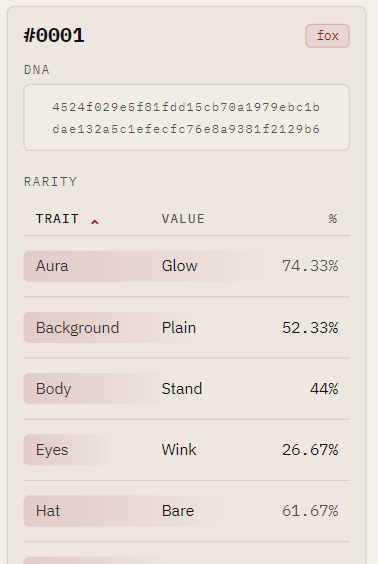
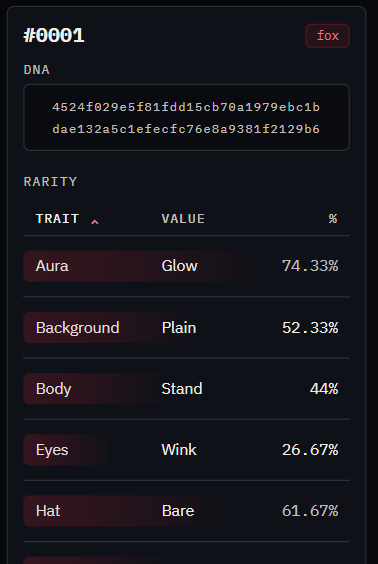
The Set browser reads the same file when you select an asset:
| Field | Is |
|---|---|
dna |
The fingerprint. Unique across the Set -- see How uniqueness is decided. |
seed |
The seed that produced the whole collection. |
rarity |
This asset's traits with their collection-wide percentages. |
layers |
Per layer: its kind, and for Dynamic and Static, the exact hue and saturation it rolled. |
The layers block is what lets you reproduce a single asset's coloring exactly, without re-cooking
the collection.
set.json
{
  "name": "Vapor Pets",
  "count": 500,
  "seed": "launch",
  "cookbookSha256": "1df72e65a1fa7ce4de73ee52ba11371c02c8f993c40b486ae3802553b7f20214",
  "generatorVersion": "nfty/1.0",
  "distribution": [ { "recipe": "cat", "count": 279, "percent": 55.8 } ],
  "rarity":       [ { "trait_type": "Aura", "value": "Glow", "rarityPct": 73.4 } ]
}
cookbookSha256 ties the Set back to the exact CookBook that produced it. It is what
extend checks before warning you that the book has moved on.
Rarity is collection-wide
A percentage is a fact about the whole Set, so growing the Set changes every one of them.
Extending rewrites the rarity fields on existing assets. Their images and their dna never
change.