Weights and rarity
Control how common each option, layer and character type is. This page is the steps; for how the numbers combine, see Rarity and weights.
Before you start: open the CookBook in the Explorer and unlock editing (click the read-only chip).
Make one variant rarer or commoner
- Select the layer in the tree and click the pencil.
- Select the variant in the left pane.
- Type a new WEIGHT, or use the steppers. Weights are relative: weight 3 is picked three times as often as weight 1.
- Click Save, then Back.
The layer's panel shows what the weights mean:
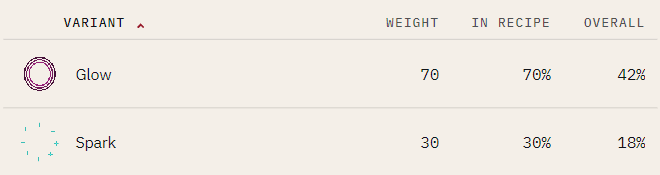
| Column | Is |
|---|---|
| WEIGHT | The number you set. |
| IN RECIPE | The share of this Recipe's assets that get the variant. |
| OVERALL | The share of the whole collection, after the Recipe's own weight and the layer's absent chance. |
Aim at OVERALL: it is the percentage a buyer sees.
Shelve a variant without deleting it
Set its weight to 0. It keeps its art and is never picked.
Make a character type rarer
- Select the CookBook and click the gear on its identity card (Book settings).
- Change the Recipe's weight under RECIPE WEIGHTS.
0shelves the Recipe. - Click Save settings.
MINT DISTRIBUTION on the CookBook panel shows the resulting shares.
Leave a layer out sometimes
Give a layer an absent chance: the percent of assets that skip it entirely. Use it for a hat only one asset in ten wears, or a glow that is usually off.
- Select the Recipe in the tree. The chance lives on the Recipe, so one layer file can be common in one Recipe and rare in another.
- In the LAYERS header, click OPTIONAL LAYERS. An ABSENT column appears.
- Type a percent into the layer's row and leave the field (Tab or Enter).
0means always present;100means never (the layer is shelved, not deleted).
The layer's panel then carries an absent flag, and its OVERALL shares already include the absence. Turning OPTIONAL LAYERS off asks first, then clears every chance in the Recipe.
What it does to the rest of the book:
- The seed still reproduces, and a book with no absent chances rolls exactly as it did before the feature existed.
- Unique DNA changes. An absent layer adds one "absent" shape beside its present ones.
- Rules still apply. An absent layer cannot trigger a rule, and an absent never together target is never a violation, but an absent always together target is, so that roll is rejected.
Use an absent chance, not an empty variant
A transparent variant looks the same but, on a Dynamic layer, still rolls a color, so two assets that both show nothing get different DNA. An absent layer rolls nothing.
From the command line
nfty set variant mybook.cbk --recipe chest --ingredient lock --id keypad --weight 3
nfty set recipe  mybook.cbk --id strongbox --weight 20
nfty set chance  cat.rcp --id hat --absent 90
nfty stats mybook.cbk          # the odds the weights now imply
set chance works on a loose .rcp. See Build a project from a script.
When a layer never shows up
Check, in order: the variant's weight (0 shelves it), the layer's absent chance, and the Recipe's rules.