Upload to IPFS
Every NFT drop runs in the same order, because metadata must carry the address of the art: upload the art, write the metadata with its address, upload the metadata, point the contract at it. nfty can do all four steps in one press, to an IPFS node on your machine or to Pinata, or you can do them by hand with any pinning service. nfty does not deploy a contract or mint.
Before you start: fill in the MARKETPLACE tab with Token id file names (the Marketplace preset already does), and leave the base URIs empty.
Choose a provider
| Provider | Needs | Set up |
|---|---|---|
| Local IPFS (default) | IPFS Desktop or Kubo running, RPC at http://127.0.0.1:5001 |
Start it. Change the address in Settings → PUBLISHING → IPFS API if yours differs. |
| Pinata | A Pinata account and an API key (JWT) | Settings → PUBLISHING: choose Pinata, paste the JWT under PINATA KEY, press Save. It is stored in your system's credential store, never a file. |
Files pinned to a local node stay reachable only while your node (or a pinning service you add them to) is online.
Upload in one step (app)
-
Open the UPLOAD tab of the export card. It names the provider and shows whether nfty can reach it (
connected · kubo 0.29.0, ornot reachableand what to start). Recheck tries again.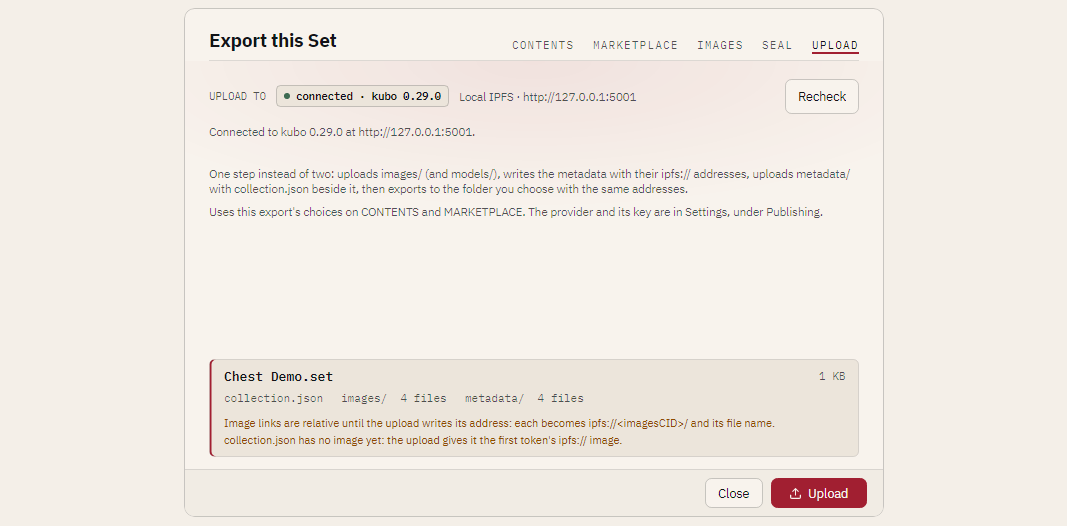
-
Press Upload and choose where to keep your copy.
nfty then:
- exports the art and pins
images/(andmodels/); - writes the metadata with those
ipfs://addresses; - pins
metadata/withcollection.jsonbeside the token files; - writes the export to your folder with the same addresses, so your copy is byte for byte what was pinned.
When it finishes, the tab shows each address with Copy:
| Address | Use |
|---|---|
| BASE URI | Your contract's baseURI: ipfs://<metadataCID>/. With token-id names, baseURI + tokenId resolves to metadata/1. |
| CONTRACT URI | Your contract's contractURI: ipfs://<metadataCID>/collection.json. |
| IMAGES, MODELS, METADATA | Each uploaded folder. |
Cancel stops between steps; whatever the service already received stays pinned. The window will not close during an upload. An upload is refused for a sealed export, one with no art or no metadata, or one with the debug mark on.
Upload in one step (command line)
nfty ipfs status                                   # exit 1 when the node is not reachable
nfty export ./collection --out ./dist --preset marketplace --upload

NFTY_PINATA="<jwt>" nfty ipfs status --pinata --pinata-key env:NFTY_PINATA
nfty export ./collection --out ./dist --preset marketplace \
    --upload --pinata --pinata-key file:./pinata.jwt
--api <url> points at a node elsewhere. The key is named by source, never typed on the command
line (see Where a secret comes from). The command
prints:
Uploaded to Local IPFS
  images:      ipfs://<imagesCID>/
  metadata:    ipfs://<metadataCID>/
  baseURI:     ipfs://<metadataCID>/
  contractURI: ipfs://<metadataCID>/collection.json
then the usual export listing. Progress goes to stderr. --upload is refused beside --seal,
--art-only, --image-base-uri and --model-base-uri, and before anything is written when the
service cannot be reached.
Upload by hand
With another pinning service, or to look at the files between steps, do it in two exports:
-
Export the art only. On the MARKETPLACE tab press Art only, or:
That writes
images/(andmodels/) with no metadata,collection.jsonorset.json. Use the same naming you will use in step 3. -
Upload
images/(andmodels/) to any pinning service (Pinata or NFT.Storage in the browser, oripfs add -r --cid-version=1 imageswith Kubo) and copy each folder's CID. -
Export again with the addresses:
nfty export ./collection --out ./dist --preset marketplace \
    --image-base-uri ipfs://<imagesCID>/ \
    --model-base-uri ipfs://<modelsCID>/ \
    --token-names token-id --start-id 1 \
    --external-url https://example.com/chest/ \
    --external-link https://example.com/ \
    --royalty 5 --fee-recipient 0x1234567890abcdef1234567890abcdef12345678
Open the result in nfty to check it.
-
Upload
metadata/withcollection.json. Its CID is your contract's base URI,ipfs://<metaCID>/; pointcontractURIatcollection.json.
Leave the image address empty and the links stay relative; the card and the terminal both warn that a
marketplace cannot resolve images/0001.png.