Make one trait rarer
Every variant carries a weight. Weights are relative: a variant at weight 3 is picked three times as often as one at weight 1. They do not need to add up to anything.
Change a variant's weight
- Unlock editing (click the read-only chip in the title bar).
- Select the layer in the tree and click the pencil to open the editor.
- Select the variant on the left.
- Type a new number into Weight, or use the steppers.
- Save.
Back on the layer's panel you can see what the numbers actually mean:
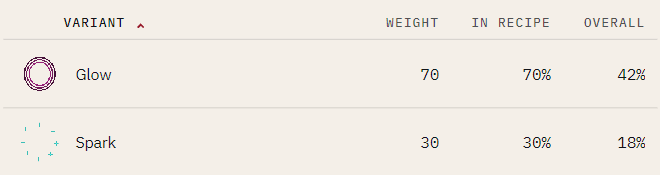
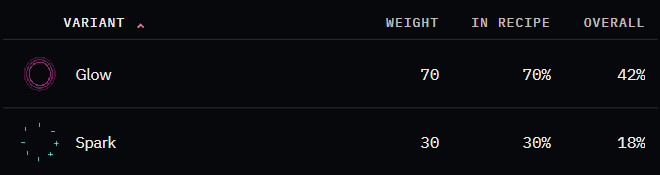
- WEIGHT — the raw number you set
- IN RECIPE — what share of this Recipe's assets get it
- OVERALL — what share of the whole collection gets it, once the Recipe's own weight is taken into account
Aim at OVERALL. That is the percentage a buyer sees.
Make a whole character type rarer
Recipes have weights too. Select the CookBook and look at MINT DISTRIBUTION — that bar is the share each Recipe takes. Change a Recipe's weight to make that character type scarcer than the other.
Shelve a variant without deleting it
Set its weight to 0. It stays in the book, keeps its art, and is never picked. Set it back above zero when you want it again.
A weight-0 variant still costs you nothing but explains a lot
If a layer is missing from your output, a weight of 0 is the first thing to check — followed by the Recipe's rules.