Kata
A local-first structured text parser and visualizer. Offline-capable, installable PWA — parse, inspect, and export entirely in-browser.
git clone https://github.com/corderro-artz/kata.git
仕様Specification
構成Composition
開発Project
目次Contents
文書Document
A local-first structured text parser and visualizer.
Kata is a worker-first, offline-capable PWA for parsing, inspecting, comparing, and exporting structured text directly in the browser. It is designed for mixed audiences: fast enough for performance-sensitive workflows, but approachable enough for developers who need a self-contained tool with no backend dependency after load.
Access
Delivery
Runtime
Performance
Overview
Kata parses, visualizes, diffs, and exports structured text entirely in-browser. The application is built around Web Workers, virtualized rendering, and progressive file handling so that large documents remain responsive without requiring a backend service.
Capabilities
| Capability | Details |
|---|---|
| Input formats | JSON, JSONC/JSON5, YAML, TOML, INI, Markdown, XML, XAML, CSV, TSV, and plain text |
| Export formats | Every input format except JSONC, which exports as JSON |
| Views | Tree, Raw, and Diff |
| Local file workflows | Manual file mode and workspace folder mode |
| Search and analysis | Indexed search, node references, and diff inspection |
| Runtime model | Dedicated parse and export workers |
| App shell | Installable PWA with offline caching |
Requirements
Use the project with the runtime and platform expectations below.
| Requirement | Version | Notes |
|---|---|---|
| Node.js | 20+ | Required for local development and builds |
| npm | 10+ | Used by the existing scripts and workflows |
| Browser | Chromium-based recommended | Full workspace file features depend on the File System Access API |
Dependencies
| Category | Packages |
|---|---|
| UI | preact, @preact/signals |
| Parsing and formats | yaml, smol-toml, ini, micromark, fast-xml-parser |
| Build | vite, @preact/preset-vite, typescript |
| PWA | vite-plugin-pwa |
| Performance tooling | lighthouse, chrome-launcher, chrome-remote-interface |
Installation
npm installQuick Start
Start the local development server:
npm run devCommon follow-up workflows:
npm run build
npm run preview
npm run check
npm run perf:report
Architecture
Kata follows a worker-first architecture with a thin Preact UI layer, virtualized rendering, and base-aware PWA configuration for local and GitHub Pages deployments.
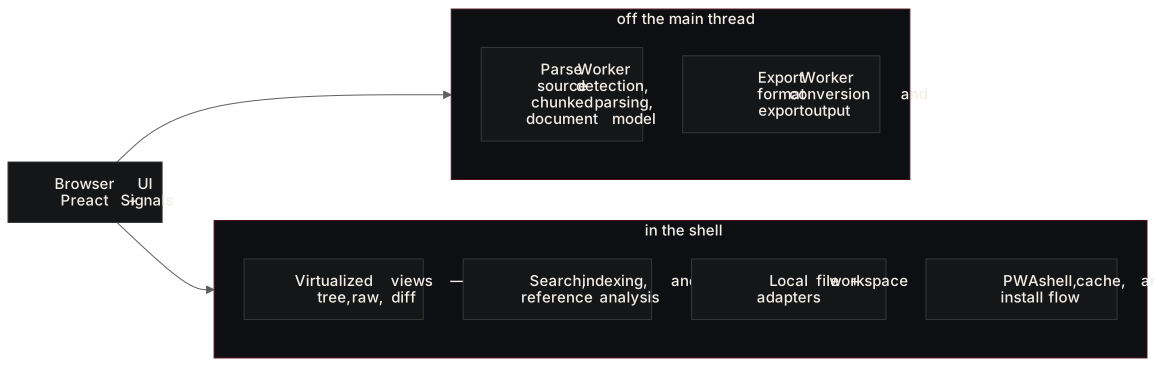
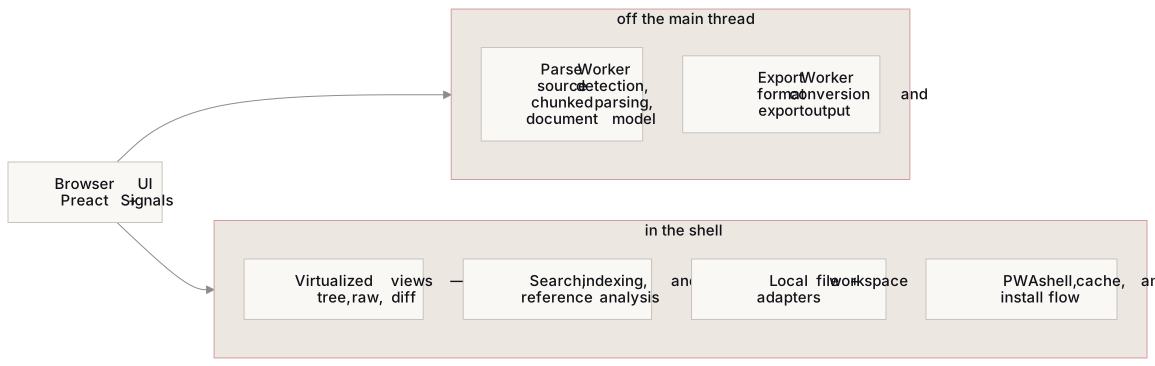
Source: docs/diagrams/architecture.mmd
Design Principles
- Keep main-thread blocking low by pushing heavy parsing and export work into workers.
- Favor local-first workflows with no required backend after the app shell loads.
- Render only what is visible so large documents remain interactive.
- Keep deployment base paths configurable so the same app works locally and on GitHub Pages.
Performance
Kata treats performance as a first-class project concern. The latest generated summary is available in reports/performance/latest.md.
| Budget | Status | Actual | Target |
|---|---|---|---|
| First render | PASS | 57.03 ms | <= 100 ms |
| View switch | PASS | 2.3 ms | <= 50 ms |
| Expand/collapse | PASS | 0.87 ms | <= 16 ms |
| Initial bundle gzip | PASS | 27,319 B | <= 51,200 B |
| Long tasks over 50 ms | PASS | 0 | 0 |
| Lighthouse mobile score | PASS | 100 | >= 90 |
| Lighthouse desktop score | PASS | 90 | >= 90 |
Lighthouse Summary
| Metric | Mobile | Desktop |
|---|---|---|
| FCP | 1316.4 ms | 1314.26 ms |
| LCP | 1578.06 ms | 1574.42 ms |
| TBT | 11.67 ms | 10.17 ms |
| CLS | 0 | 0 |
Detailed artifacts:
Development
Use the existing npm scripts and GitHub workflows to keep the repo in a releasable state.
npm run dev
npm run check
npm run build
npm run perf:report
Workflow Notes
npm run checkruns the TypeScript build checks.npm run buildproduces the production Vite bundle.npm run perf:reportbuilds, previews, audits, and refreshes tracked performance artifacts.- The CI workflow runs type-checking and build validation on pushes and pull requests.
Deployment
Kata is deployed to GitHub Pages and uses a configurable app base so the same build can run from / locally and from a repository path in hosted environments.
- Environment: GitHub Pages
- Workflow: Deploy Pages workflow
- Live URL: Kata live site
- Performance automation: Performance Report workflow
Troubleshooting
Use these constraints when local behavior does not match the hosted app or when file access features appear limited.
Note: Workspace folder mode depends on browser support for the File System Access API, so Chromium-based browsers provide the most complete experience.
Note: The performance report workflow needs a Chrome executable. In CI this is provided by
browser-actions/setup-chrome; locally you may need to setCHROME_PATH.
Links
| Resource | Link |
|---|---|
| Repository | github.com/corderro-artz/kata |
| Live site | corderro-artz.github.io/kata |
| Specification | specification.md |
| Performance summary | reports/performance/latest.md |
| CI workflow | .github/workflows/ci.yml |
| Pages workflow | .github/workflows/deploy-pages.yml |
| Performance workflow | .github/workflows/perf-report.yml |
| Releases | GitHub releases |
| Tags | Git tags |
| License | LICENSE |
| Issues | GitHub issues |
| Pull requests | GitHub pull requests |
| Actions | GitHub Actions |
| Security | GitHub security overview |
| Vaporsoft | vaporsoft.dev |
Contributing
- Create a branch from
mainfor the change. - Run
npm run checkandnpm run buildbefore opening a pull request. - Run
npm run perf:reportwhen the change affects runtime or bundle behavior. - Open a pull request with enough context to review product, architecture, and performance impact.
Copyright © 2026 Corderro Artz / Vaporsoft.
版Published
v0.1.0-alpha
Prerelease28 Mar 2026Kata v0.1.0-alpha
Local-first structured text parser and visualizer. Offline-capable, installable PWA.
Spec Budgets — All PASS
| Budget | Actual | Target |
|---|---|---|
| First render | 62.8 ms | ≤ 100 ms |
| View switch | 2.5 ms | ≤ 50 ms |
| Expand/collapse | 0.9 ms | ≤ 16 ms |
| Bundle gzip | 24 KB | ≤ 50 KB |
| Long tasks | 0 | 0 |
Lighthouse
| Profile | Score | CLS |
|---|---|---|
| Mobile | 99 | 0 |
| Desktop | 90 | 0 |
Install
Download \kata-0.1.0-alpha-pwa.zip\, extract, and serve with any static file server. The app is a fully offline-capable PWA — visit it in Chrome/Edge and install via the browser's install prompt.
履歴Recent commits
e504170chore: update performance reports7c5747dfix: build for the domain root, not a /kata/ pathfefd86bchore: update performance reportsa4fbb3edocs: render the diagrams on the brand palette, and give them a generator1b571a6chore: update performance reports6fc2084ci: allow CI to be run manually711edf8chore: update performance reportse67cfc4fix: clear the dependency advisories and deploy refreshed reports